
Pigeonhole Portable Organizer
Version 1.30.30
Freeware
Free
1 downloads
Ever wished you could just type stuff and find it
again without having to save it and then remember what
you called the file and which folder you put it in?
Well now you can with Pigeonhole.
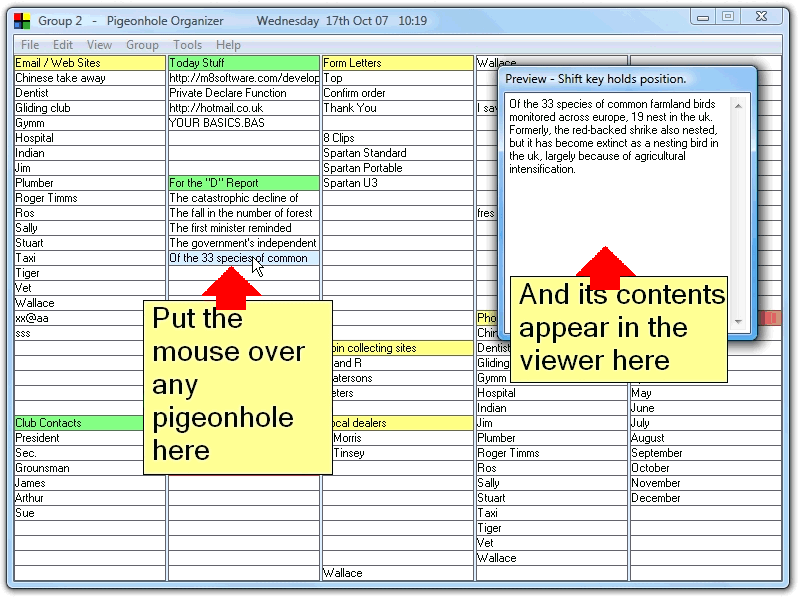
Pigeonhole shows you a grid of pigeonholes similar to
a spread sheet. Click on a pigeonhole and type in
whatever you want - it is saved automatically. When
you want to recall the information, just move the
mouse over the grid. Whatever you typed into the
pigeonhole the mouse is over appears automatically in
the viewer window. There are 175 pigeonholes displayed
at any one time so you can view up to 175 different
pieces of information just by moving the mouse over
the grid. This is the portable version.
again without having to save it and then remember what
you called the file and which folder you put it in?
Well now you can with Pigeonhole.
Pigeonhole shows you a grid of pigeonholes similar to
a spread sheet. Click on a pigeonhole and type in
whatever you want - it is saved automatically. When
you want to recall the information, just move the
mouse over the grid. Whatever you typed into the
pigeonhole the mouse is over appears automatically in
the viewer window. There are 175 pigeonholes displayed
at any one time so you can view up to 175 different
pieces of information just by moving the mouse over
the grid. This is the portable version.
Program details
Publisher
John TurnbullE-mail
Contact the publisherPlatforms
Win7 x32<br>Win7 x64<br>Windows 10<br>WinServer<br>Windows XP<br>Windows 2000<br>WinVista<br>WinVista x64<br>WinOtherFile size
2656 KBFile date
5/31/2018License
FreewareInstallation
Install & UninstallRecord updated
5/31/2018


