
Flash Recovery Toolbox
Version 1.1.17
Shareware
$27.00
0 downloads
Take a closer look at Flash Recovery Toolbox and make
sure you may easily get your data back without
additional explanations and data recovery services.
This program is so easy to use that you may simply
follow its guidelines and install the utility on any
PC for flash drive recovery purposes. This application
does not have compatibility issues so you may start
recovering flash drives immediately after the
occurrence of data corruption problems. Pay attention
to the size of downloaded file, the installer of Flash
Recovery Toolbox is really small so you may get it
within several seconds despite possible traffic
limitations in the local area network of your company.
Click the installer of flash recovery tool as soon as
you get it on your PC, install Flash Recovery Toolbox
and start repairing usb drives, floppy disks, smart
cards and other supported devices using the FAT file
system. Look through the screenshots of flash memory
repair process, the description of Flash Recovery
Toolbox can be found on the website of application
developer or simply follow the guidelines. It should
not be too complicated even for inexperienced users,
therefore there is no need for additional
explanations. Click the shortcut of Flash Recovery
Toolbox as soon as you install this application and go
to the following stage of data recovery by selecting a
flash drive to be processed. Now you may start the
analysis of selected drive in FAT format by using the
Next softkey, Flash Recovery Toolbox automatically
moves to the following stage so you should be patient
and wait for the end of flash drive restore. The
analysis of selected drive depends on various factors,
including the speed of CPU, the size of corrupted
drive and the overall performance of selected PC. As
soon as the processing of corrupted device is
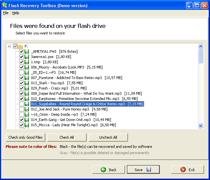
successfully completed, Flash Recovery Toolbox
provides the list of successfully repaired documents
that can be now saved to any other disk or removable
media.
sure you may easily get your data back without
additional explanations and data recovery services.
This program is so easy to use that you may simply
follow its guidelines and install the utility on any
PC for flash drive recovery purposes. This application
does not have compatibility issues so you may start
recovering flash drives immediately after the
occurrence of data corruption problems. Pay attention
to the size of downloaded file, the installer of Flash
Recovery Toolbox is really small so you may get it
within several seconds despite possible traffic
limitations in the local area network of your company.
Click the installer of flash recovery tool as soon as
you get it on your PC, install Flash Recovery Toolbox
and start repairing usb drives, floppy disks, smart
cards and other supported devices using the FAT file
system. Look through the screenshots of flash memory
repair process, the description of Flash Recovery
Toolbox can be found on the website of application
developer or simply follow the guidelines. It should
not be too complicated even for inexperienced users,
therefore there is no need for additional
explanations. Click the shortcut of Flash Recovery
Toolbox as soon as you install this application and go
to the following stage of data recovery by selecting a
flash drive to be processed. Now you may start the
analysis of selected drive in FAT format by using the
Next softkey, Flash Recovery Toolbox automatically
moves to the following stage so you should be patient
and wait for the end of flash drive restore. The
analysis of selected drive depends on various factors,
including the speed of CPU, the size of corrupted
drive and the overall performance of selected PC. As
soon as the processing of corrupted device is
successfully completed, Flash Recovery Toolbox
provides the list of successfully repaired documents
that can be now saved to any other disk or removable
media.
Program details
Publisher
Alex KrenvalkE-mail
Contact the publisherPlatforms
Windows 98<br>Windows ME<br>Windows NT 3.x<br>WindFile size
1245 KBFile date
1/16/2012License
SharewareInstallation
Install & UninstallRecord updated
3/19/2012


