Docsmartz Convert PDF to Word Documents
Version 5.0
Shareware
$39.95
0 downloads
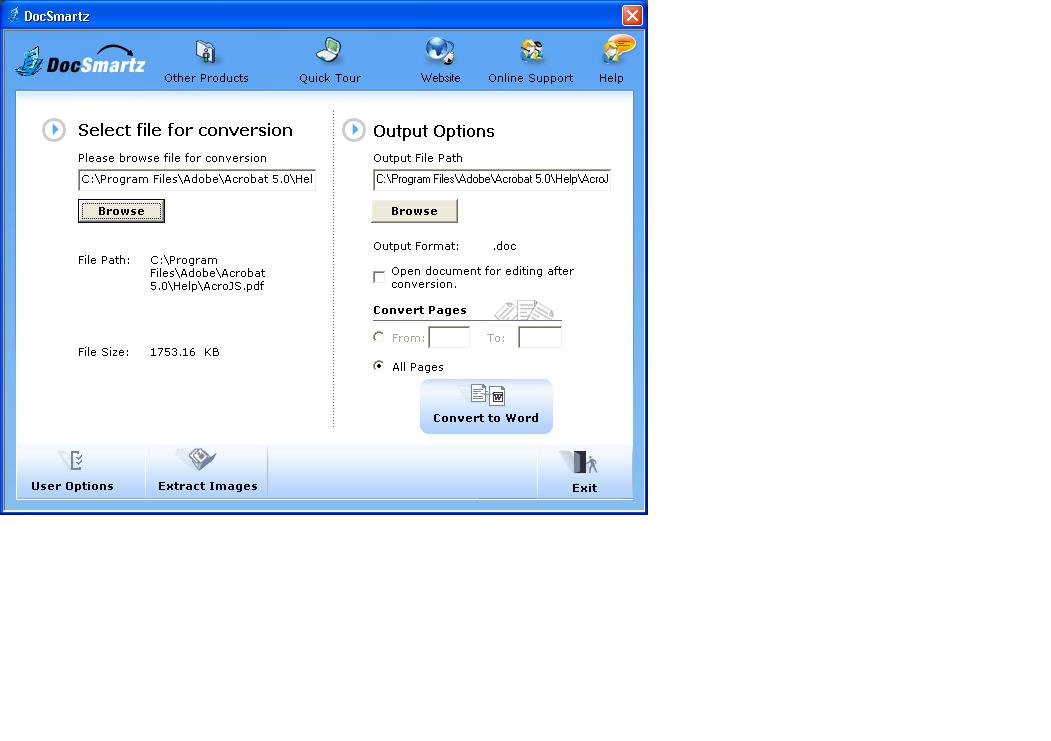
DocSmartz PDF Conversion software can convert PDF
files to Word documents (or the .rtf format) and text
documents to PDF files.
DocSmartz PDF Converter 5.0 Features
- DocSmartz 5.0 Compatible with Windows Vista.
- Supports JPX images conversion
- Compatible with PDF 1.7
- Improved support for symbolic fonts (alpha, beta
etc)
- Enhanced features for Conversion of Rotated Text
- Improved Subscript and superscript support
- Better overall conversion quality
- You can convert PDF files to multiple Word
formats .doc or .rtf.
- You can convert text documents to PDF files.
- You can preserve the original layout and maintain
the originality of the PDF documents.
- Features like character spacing, log file, image
filter, automatic anchoring and optimized conversion
makes it easy to use.
- No reformatting is required as it identifies
tables, paragraphs and columns.
- Enables you to combine more than one PDF files to
Word format.
- Supports the embedding of True Type fonts and
supports 679 font families and 5400 fonts.
- Does not require MS Word installation.
- Supports partial PDF file conversion. You can
choose specific pages to convert or convert all
pages.
- Identifies and separates logos and banners.
- You can extract images from a PDF file.
- Customize the user interface language by selecting
from 10 international languages.
- Comprehensive help file included
- Docsmartz offers US daytime telephone support and
24 hour email support.
The payment gateway on Docsmartz is hosted on a Https
(secure) server and is fully secure. Docsmartz takes
special care to ensure that your credit card and
billing information is not compromised and is fully
secure. The Docsmartz privacy policy also ensures
that any personal detail as provided by you is kept
secure and is not used in any way other than as laid
down in the policy.
files to Word documents (or the .rtf format) and text
documents to PDF files.
DocSmartz PDF Converter 5.0 Features
- DocSmartz 5.0 Compatible with Windows Vista.
- Supports JPX images conversion
- Compatible with PDF 1.7
- Improved support for symbolic fonts (alpha, beta
etc)
- Enhanced features for Conversion of Rotated Text
- Improved Subscript and superscript support
- Better overall conversion quality
- You can convert PDF files to multiple Word
formats .doc or .rtf.
- You can convert text documents to PDF files.
- You can preserve the original layout and maintain
the originality of the PDF documents.
- Features like character spacing, log file, image
filter, automatic anchoring and optimized conversion
makes it easy to use.
- No reformatting is required as it identifies
tables, paragraphs and columns.
- Enables you to combine more than one PDF files to
Word format.
- Supports the embedding of True Type fonts and
supports 679 font families and 5400 fonts.
- Does not require MS Word installation.
- Supports partial PDF file conversion. You can
choose specific pages to convert or convert all
pages.
- Identifies and separates logos and banners.
- You can extract images from a PDF file.
- Customize the user interface language by selecting
from 10 international languages.
- Comprehensive help file included
- Docsmartz offers US daytime telephone support and
24 hour email support.
The payment gateway on Docsmartz is hosted on a Https
(secure) server and is fully secure. Docsmartz takes
special care to ensure that your credit card and
billing information is not compromised and is fully
secure. The Docsmartz privacy policy also ensures
that any personal detail as provided by you is kept
secure and is not used in any way other than as laid
down in the policy.
Program details
Publisher
Docsmartz PDF Converter Convert PDF to WordE-mail
Contact the publisherPlatforms
Windows 98<br>Windows ME<br>Windows NT 4.x<br>WindFile size
14453 KBFile date
8/31/2007License
SharewareInstallation
Install & UninstallRecord updated
9/17/2007

