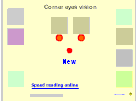
Coner vision
Version 1
Freeware
Free
0 downloads
Look first at the red dot in the middle of the screen.
Try to look at the (whole) picture with a diffused
view. When you see a pair of boxes of the same color,
select both of them by left clicking on the matching
box in the right row of colored boxes and also left
clicking on the matching colored box in the left row
of colored boxes. If your selection is correct, two
green dots will appear.
Press the red dot at the center of the screen if you
want to start a new task.
Try to look at the (whole) picture with a diffused
view. When you see a pair of boxes of the same color,
select both of them by left clicking on the matching
box in the right row of colored boxes and also left
clicking on the matching colored box in the left row
of colored boxes. If your selection is correct, two
green dots will appear.
Press the red dot at the center of the screen if you
want to start a new task.
Program details
Publisher
reading magicE-mail
Contact the publisherPlatforms
Windows 95<br>Windows 98<br>Windows ME<br>Windows File size
19 KBFile date
1/1/2009License
FreewareInstallation
No InstallRecord updated
10/18/2009


