
Send Personally
Version 2.0
Shareware
$24.00
0 downloads
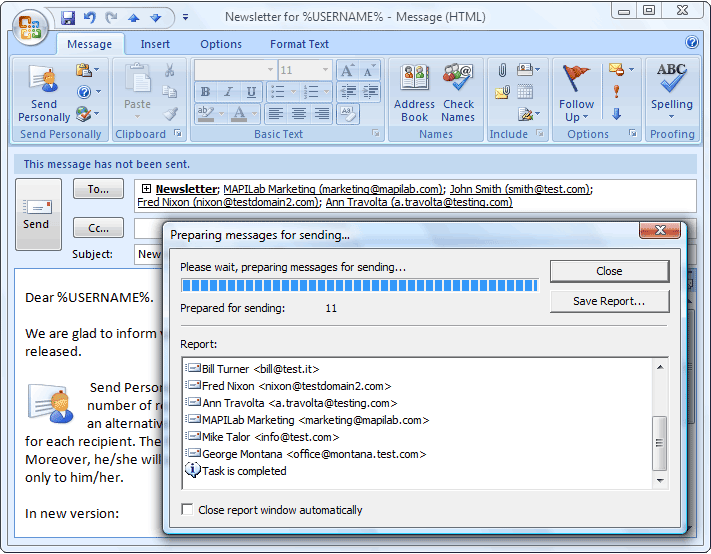
Add-in Send Personally is designed to send messages to
a great number of recipients via Microsoft Outlook (32
and 64-bit). Add-in offers an alternative method of
sending messages from Outlook, separate message being
created for each recipient. The final recipient will
get no information about the other recipients.
Moreover, he/she will see only his/her name and
address in the "To" field, as if the message was sent
only to him/her. The main problem with sending
messages through Outlook is that Outlook shows all the
recipients in the message heading. If the recipient
list is relatively small, this doesn't result in any
considerable inconvenience. However, if a message is
sent to hundreds of recipients, its heading size might
many times exceed the size of the message text and all
attachments. Send Personally offers an easy solution
to the problem. And you won't need to perform any
additional actions. The only thing you will have to do
is to press the button "Send Personally" instead of
the standard "Send" button. With Send Personally, no
special setup procedures are needed: it is ready to
a great number of recipients via Microsoft Outlook (32
and 64-bit). Add-in offers an alternative method of
sending messages from Outlook, separate message being
created for each recipient. The final recipient will
get no information about the other recipients.
Moreover, he/she will see only his/her name and
address in the "To" field, as if the message was sent
only to him/her. The main problem with sending
messages through Outlook is that Outlook shows all the
recipients in the message heading. If the recipient
list is relatively small, this doesn't result in any
considerable inconvenience. However, if a message is
sent to hundreds of recipients, its heading size might
many times exceed the size of the message text and all
attachments. Send Personally offers an easy solution
to the problem. And you won't need to perform any
additional actions. The only thing you will have to do
is to press the button "Send Personally" instead of
the standard "Send" button. With Send Personally, no
special setup procedures are needed: it is ready to
Program details
Publisher
Andrey ManchukE-mail
Contact the publisherPlatforms
Win7 x32<br>Win7 x64<br>Windows XP<br>Windows 2000<br>Windows NT 3.x<br>Windows NT 4.x<br>Windows 95<br>Windows 98<br>Windows ME<br>WinVista<br>WinVista x64File size
5180 KBFile date
3/10/2014License
SharewareInstallation
Install & UninstallRecord updated
10/28/2014