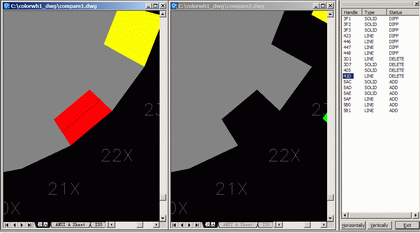

OverCAD Dwg Compare
Version 2.00
Shareware
$90.00
0 downloads
OverCAD Dwg Compare allows you to finds differences
between versions of AutoCAD drawings and displays them
graphically.
01.Find the differences between two revisions of an
AutoCAD drawing.
02.Display the differences in AutoCAD, using
contrasting colors for Added entities, Deleted
entities etc.
03.Choose your own markup colours, a legend can be
created automatically.
04.Save the differences to separate files. This
creates for example a DWG file which contains all new
entities.
05.Synchronism zoom the result drawings.
06.Synchronism location the selected entity when you
click the result report list.
07.Detail report the different entities.
08.Select the specially entities to compare.
09.Save compare result and quick browse them again.
between versions of AutoCAD drawings and displays them
graphically.
01.Find the differences between two revisions of an
AutoCAD drawing.
02.Display the differences in AutoCAD, using
contrasting colors for Added entities, Deleted
entities etc.
03.Choose your own markup colours, a legend can be
created automatically.
04.Save the differences to separate files. This
creates for example a DWG file which contains all new
entities.
05.Synchronism zoom the result drawings.
06.Synchronism location the selected entity when you
click the result report list.
07.Detail report the different entities.
08.Select the specially entities to compare.
09.Save compare result and quick browse them again.
Program details
Publisher
Contact OverCADE-mail
Contact the publisherPlatforms
Windows 98<br>Windows ME<br>Windows 2000<br>WindowFile size
253 KBFile date
12/18/2007License
SharewareInstallation
Install & UninstallRecord updated
12/18/2007


