
Adolix PDF Converter PRO
Version 4.4
Commercial Demo
$49.95
1 downloads
Adolix PDF Converter PRO is PDF writer software that
will help you create PDF files from virtually any
application. The idea is very simple: open the file
you want to convert to PDF, click print and select the
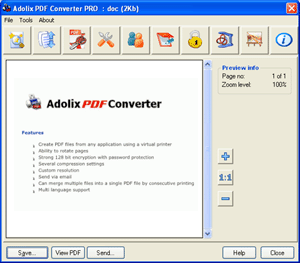
PDF Converter printer. This set of actions will open
the main PDF Converter PRO windows and you will be
able to manage you PDF file.
This PDF writer utility offers you a wide set of
options that make it perfect for both home users and
companies. You can protect your PDF files with Adolix
PDF Converter PRO security options like 128 bit
encryption and password.
You can also merge multiple files into a final PDF
document. All you have to do is to print them one by
one. You can change the order of a page in a certain
document or even the entire document order in the
list. After you finish it's best to preview your
creation using the built-in PDF preview engine. You
don't need Adobe Acrobat Reader to preview files
will help you create PDF files from virtually any
application. The idea is very simple: open the file
you want to convert to PDF, click print and select the
PDF Converter printer. This set of actions will open
the main PDF Converter PRO windows and you will be
able to manage you PDF file.
This PDF writer utility offers you a wide set of
options that make it perfect for both home users and
companies. You can protect your PDF files with Adolix
PDF Converter PRO security options like 128 bit
encryption and password.
You can also merge multiple files into a final PDF
document. All you have to do is to print them one by
one. You can change the order of a page in a certain
document or even the entire document order in the
list. After you finish it's best to preview your
creation using the built-in PDF preview engine. You
don't need Adobe Acrobat Reader to preview files
Program details
Publisher
Adolix SoftwareE-mail
Contact the publisherPlatforms
Windows NT 3.x<br>Windows NT 4.x<br>Windows 2000<bFile size
6950 KBFile date
8/2/2010License
Commercial DemoExpiration info
Watermark on each pageInstallation
Install & UninstallRecord updated
2/9/2010