
CareWindows Process Control Master Free Version
Version 5.0.1.1
Shareware
$19.99
0 downloads
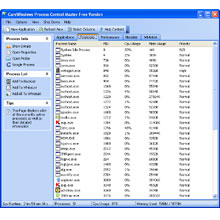
CareWindows Process Control Master Free Version is an
advanced process management utility that picks up
where Task Manager leaves off. It will show you
detailed information about a process. For each
process, it improves on Windows Task Manager,
providing a process description, file path, command
line, start time and file version. CareWindows Process
Control Master provides information about programs and
processes running on your computer. It also displays
the most commonly used performance measures for
processes. You can use Process Control Master to
manage key indicators of your computer's performance.
You can see the status of the programs that are
running and end programs that have stopped responding.
You can also assess the activity of running processes
using , and see graphs and data on CPU and memory
usage.
It is also an essential tool for dealing with badly-
behaved programs. It allows you to kill programs
manually if necessary.
It offers multiple options of process information. It
Overcomes the limitations of the Microsoft Tasks
application. These characteristics information columns
you selected will be displayed in Processes tab.
Besides, it can terminate almost any process on a
Windows machine, including any service and process
running in the system. Even protected Microsoft system
processes can be terminated. Blacklist or White list
will terminate unwanted or badly-behaved processes
immediately. If you want to terminate processes, add
unwanted processes to Blacklist, then Blacklist will
terminate all listed processes immediately. If you add
allowed or safe processes in whitelist , CareWindows
Process Control Master will terminate all unlisted
processes.
advanced process management utility that picks up
where Task Manager leaves off. It will show you
detailed information about a process. For each
process, it improves on Windows Task Manager,
providing a process description, file path, command
line, start time and file version. CareWindows Process
Control Master provides information about programs and
processes running on your computer. It also displays
the most commonly used performance measures for
processes. You can use Process Control Master to
manage key indicators of your computer's performance.
You can see the status of the programs that are
running and end programs that have stopped responding.
You can also assess the activity of running processes
using , and see graphs and data on CPU and memory
usage.
It is also an essential tool for dealing with badly-
behaved programs. It allows you to kill programs
manually if necessary.
It offers multiple options of process information. It
Overcomes the limitations of the Microsoft Tasks
application. These characteristics information columns
you selected will be displayed in Processes tab.
Besides, it can terminate almost any process on a
Windows machine, including any service and process
running in the system. Even protected Microsoft system
processes can be terminated. Blacklist or White list
will terminate unwanted or badly-behaved processes
immediately. If you want to terminate processes, add
unwanted processes to Blacklist, then Blacklist will
terminate all listed processes immediately. If you add
allowed or safe processes in whitelist , CareWindows
Process Control Master will terminate all unlisted
processes.
Program details
Publisher
CareWindows Corp.E-mail
Contact the publisherPlatforms
Windows 98<br>Windows ME<br>Windows NT 3.x<br>WindFile size
1642 KBFile date
4/15/2009License
SharewareExpiration info
12 free trialInstallation
Install & UninstallRecord updated
4/15/2009


