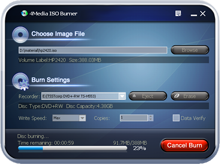

4Media ISO Burner
Version 1.0.56.0917
Shareware
$19.99
2 downloads
With 4Media ISO Burner, burn ISO file is not a
difficult thing. Not only can the ISO Burner tool help
you burn ISO file into CD/DVD disc, but also these
formats, such as BIN/CUE, IMG, MDF, NRG, CDI, etc.,
can be burned effortlessly.
Although the ISO Burner is very small, it supports
many output formats, e.g. CD-R, CD-RW, DVD-R, DVD+R,
DVD-RW, DVD+RW, dual-layer DVD. After burning, the
program will verify the written data so as to
guarantee the information veracity and usability. Own
it and experience the high compatibility and fast
burning speed.
Key features:
1. Various input formats
The smart 4Media ISO Burner tool supports dozens of
input formats such as ISO, BIN/CUE, IMG, MDF, NRG,
CDI, B5i, B6i, DMG, etc.
2. Support multiple disc formats
The software supports abundant output formats
including CD-R, CD-RW, DVD-R, DVD+R, DVD-RW, DVD+RW,
DVD+R DL. It also burn ISO file into dual-layer DVD,
if the driver permits.
3. More burning settings
According to requirement, you can select proper
burning speed value. Moreover, the tool enables you to
burn multiple output files.
4. Erase disc information
The ISO-Burner has the ability of erasing the old info
of disc, if you need.
5. Verify the info of disc
For guaranteeing the correctness of written disc, it
will verify the information after burning the files.
6. Automatically update
Once connecting to the net, the software will check
the latest version automatically in order to give you
more convenience.
7. Easy to use
With just few clicks, you can accomplish the whole
burning process freely. Additionally, it also provides
the actions after burning in order to save more system
resources.
8. Multiple languages
It offers you many interface languages such as
English, Japanese, German, etc.
9.Adjustable interface skins.
10.Burn CD disc from CUE/BIN, CUE/FLAC, CUE/APE, and
CUE/WAV files.
11.It is capable of Windows 7.
difficult thing. Not only can the ISO Burner tool help
you burn ISO file into CD/DVD disc, but also these
formats, such as BIN/CUE, IMG, MDF, NRG, CDI, etc.,
can be burned effortlessly.
Although the ISO Burner is very small, it supports
many output formats, e.g. CD-R, CD-RW, DVD-R, DVD+R,
DVD-RW, DVD+RW, dual-layer DVD. After burning, the
program will verify the written data so as to
guarantee the information veracity and usability. Own
it and experience the high compatibility and fast
burning speed.
Key features:
1. Various input formats
The smart 4Media ISO Burner tool supports dozens of
input formats such as ISO, BIN/CUE, IMG, MDF, NRG,
CDI, B5i, B6i, DMG, etc.
2. Support multiple disc formats
The software supports abundant output formats
including CD-R, CD-RW, DVD-R, DVD+R, DVD-RW, DVD+RW,
DVD+R DL. It also burn ISO file into dual-layer DVD,
if the driver permits.
3. More burning settings
According to requirement, you can select proper
burning speed value. Moreover, the tool enables you to
burn multiple output files.
4. Erase disc information
The ISO-Burner has the ability of erasing the old info
of disc, if you need.
5. Verify the info of disc
For guaranteeing the correctness of written disc, it
will verify the information after burning the files.
6. Automatically update
Once connecting to the net, the software will check
the latest version automatically in order to give you
more convenience.
7. Easy to use
With just few clicks, you can accomplish the whole
burning process freely. Additionally, it also provides
the actions after burning in order to save more system
resources.
8. Multiple languages
It offers you many interface languages such as
English, Japanese, German, etc.
9.Adjustable interface skins.
10.Burn CD disc from CUE/BIN, CUE/FLAC, CUE/APE, and
CUE/WAV files.
11.It is capable of Windows 7.
Program details
Publisher
4Media Software StudioE-mail
Contact the publisherPlatforms
Windows XPFile size
5627 KBFile date
9/19/2010License
SharewareInstallation
Install & UninstallRecord updated
10/18/2010


