
iPod Copier
Version 1.0.0.0
Freeware
Free
0 downloads
iPod Copier is very easy to use tool to Copy your iPod
Device(Any Type), you can copy tracks from iPod to
your local hard drive. With iPod Copier you can: 1-
View all Audio/Video iPod Contents. 2- Play
Audio/Video Tracks of the iPod. 3- View the properties
of the Audio/Video tracks of the iPod. 4- Copy
Audio/Video tracks from iPod to local hard drive. 5-
Search in the tracks properties to easily find the
desired track. 6- Support All iPod Types. The iPod
must be configured for disk use IF you have iTunes
installed in your system (You will find this option in
the iPod options in the iTunes Application). It's
recommended to connect the iPod to the computer before
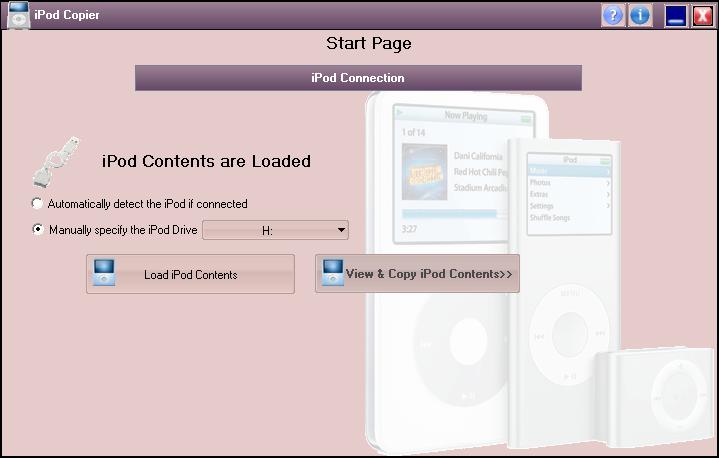
launching the iPod Copier. The transfer page contains
the following 2 main Sections:- iPod Connection: This
section will load iPod Contents (Audio/Video Files),
So you can view and copy them:- Automatically detect
the iPod: If you select this option, Then iPod Copier
will automatically specify the iPod Drive, Manually
Specify the iPod Drive: With this option you will
specify the iPod Drive, In general selecting this
option speeds up the loading process a little bit, and
View and Copy iPod Contents: Click this button to go
to the Copy Page to view and Copy iPod Contents. This
button is hidden by default and will not appear unless
the iPod DB is loaded successfully.
Device(Any Type), you can copy tracks from iPod to
your local hard drive. With iPod Copier you can: 1-
View all Audio/Video iPod Contents. 2- Play
Audio/Video Tracks of the iPod. 3- View the properties
of the Audio/Video tracks of the iPod. 4- Copy
Audio/Video tracks from iPod to local hard drive. 5-
Search in the tracks properties to easily find the
desired track. 6- Support All iPod Types. The iPod
must be configured for disk use IF you have iTunes
installed in your system (You will find this option in
the iPod options in the iTunes Application). It's
recommended to connect the iPod to the computer before
launching the iPod Copier. The transfer page contains
the following 2 main Sections:- iPod Connection: This
section will load iPod Contents (Audio/Video Files),
So you can view and copy them:- Automatically detect
the iPod: If you select this option, Then iPod Copier
will automatically specify the iPod Drive, Manually
Specify the iPod Drive: With this option you will
specify the iPod Drive, In general selecting this
option speeds up the loading process a little bit, and
View and Copy iPod Contents: Click this button to go
to the Copy Page to view and Copy iPod Contents. This
button is hidden by default and will not appear unless
the iPod DB is loaded successfully.
Program details
Publisher
MyiPod CityE-mail
Contact the publisherPlatforms
Windows 95<br>Windows 98<br>Windows ME<br>Windows File size
4699 KBFile date
10/28/2008License
FreewareInstallation
Install & UninstallRecord updated
11/5/2008


