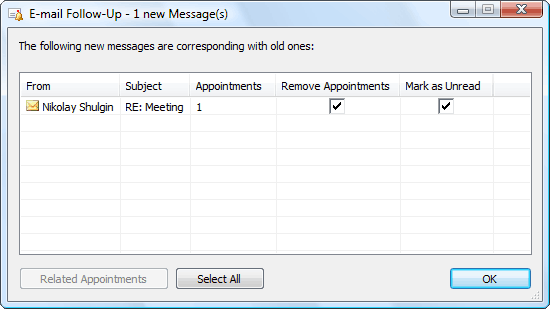

E-mail Follow-Up
Version 1.10.3
Shareware
$24.00
5 downloads
E-mail Follow-Up allows (and reminds you!) to send
follow-up e-mail messages if a reply has not been sent
within a specified time-frame. E-mail Follow-Up will
watch for messages and show an alert when a reply has
not been sent. E-mail Follow-Up also allows you to
send a follow up message using a predefined template
to remind the recipient that the reply hasn't been
sent. "I wrote to them and they didn't answer!" - this
is a typical ending for many negotiations though the
result could be different if the message had been
noted in time and resent or maybe even followed up
with a telephone call. Now E-mail Follow-Up will
follow up the messages left without a reply instead of
you, and not only remind you about such messages but
offer you the option to send a Follow-Up template
message to remind the user that a reply hasn't been
sent yet. E-mail Follow-Up adds two buttons: "Follow-
Up" and "Custom" into the toolbar of the Message
Editor (click the button "New e-mail message"). Using
these two buttons to send a message the message can be
considered to be under control. In the first case you
follow-up e-mail messages if a reply has not been sent
within a specified time-frame. E-mail Follow-Up will
watch for messages and show an alert when a reply has
not been sent. E-mail Follow-Up also allows you to
send a follow up message using a predefined template
to remind the recipient that the reply hasn't been
sent. "I wrote to them and they didn't answer!" - this
is a typical ending for many negotiations though the
result could be different if the message had been
noted in time and resent or maybe even followed up
with a telephone call. Now E-mail Follow-Up will
follow up the messages left without a reply instead of
you, and not only remind you about such messages but
offer you the option to send a Follow-Up template
message to remind the user that a reply hasn't been
sent yet. E-mail Follow-Up adds two buttons: "Follow-
Up" and "Custom" into the toolbar of the Message
Editor (click the button "New e-mail message"). Using
these two buttons to send a message the message can be
considered to be under control. In the first case you
Program details
Publisher
Andrey ManchukE-mail
Contact the publisherPlatforms
Windows 98<br>Windows ME<br>Windows NT 3.x<br>Windows NT 4.x<br>Windows 2000<br>Windows XPFile size
5526 KBFile date
3/27/2014License
SharewareInstallation
Install & UninstallRecord updated
4/30/2014


