
HtaEdit
Version 1.0.24
Shareware
$39.00
1 downloads
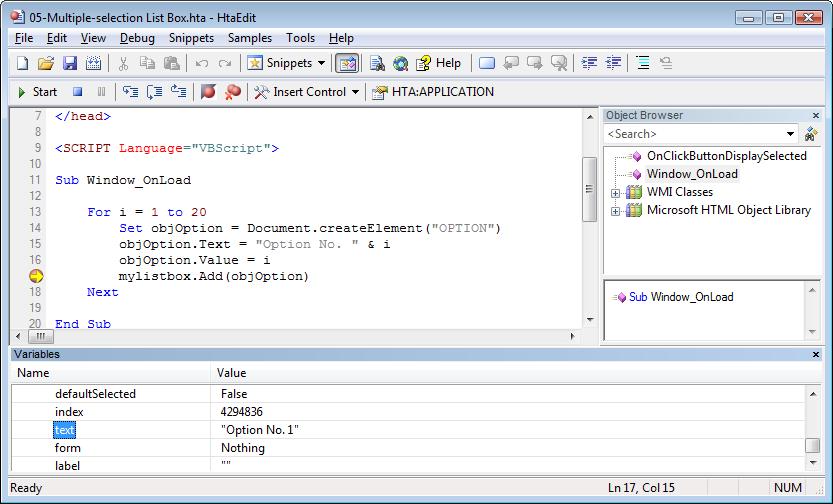
HtaEdit (http://www.htaedit.com) is an editor that dramatically reduces the time you spend writing HTML applications. HtaEdit has an integrated debugger that make troubleshooting a seamless experience.The editor displays the values assigned to variables during debugging. HTaEdit lets you set breakpoints and step through the code one line at a time. HtaEdit provides the ability to run your HTAs directly from within the editor. HTaEdit has the Microsoft VBScript 5.6 help file integrated into its editor, so all you need to do is press F1 to open the Help file and jump to the word under the cursor. After the name of a class or object, type a . (period) for an object instance : HtaEdit displays a list of valid member variables or functions for the appropriate object or class. After the name of a function, type an open parenthesis : HTaEedit displays the complete declaration for the function in a pop-up window just under the insertion point. The Object Browser allows you to examine and discover WMI classes and objects used in the current script and their members. HtaEdit support syntax coloring and can display line numbers. Code snippets are one of the coolest new features in HtaEdit. Code snippets are customizable code fragments intended to accomplish simple to intermediate tasks quickly; they can be inserted into your code with just a few keystrokes. What really makes code snippets so convenient to use is the replacement fields, highlighted areas that identify the values you may commonly want to replace to fit the snippet to your specific task. You can use F4 to move through replacement fields (ex: Type "select" and press F4).
Program details
Publisher
Adersoft ComputingE-mail
Contact the publisherHome page
http://www.htaedit.com/Platforms
Windows 2000<br>Windows XPFile size
3807 KBFile date
9/30/2008License
SharewareInstallation
Install & UninstallRecord updated
11/25/2008


