
QVCS
Version 3.10.17
Shareware
$39.00
0 downloads
QVCS is an affordable version control system for the
Windows developer. It matches more expensive products
in features that are useful to small development
teams, and is easy to use and administer. See at a
glance which files are checked out, which files have
changed since check out, who most recently changed a
file, etc. Directory recursion allows you to see this
for a single directory, or for an entire project.
Perform common operations like check in or check out
with the click of a button. QVCS supports both text
and binary files. QVCS has extensive on-line help, and
two separate tutorials to introduce a new user to the
product.
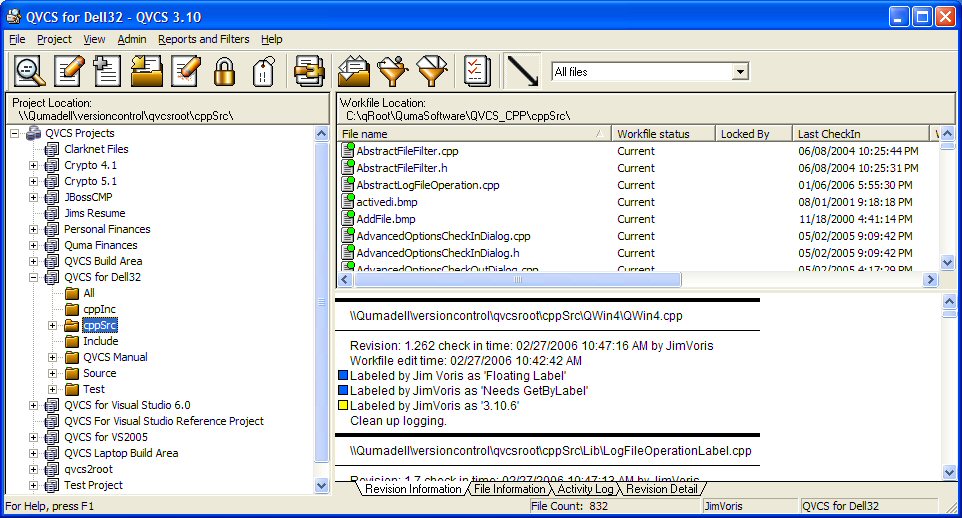
The QVCS GUI tool (called QWin) displays the revision
history of the files in a project and allows the user
to sort the revision history by a number of criteria,
including file status, checkin date, filename, locker,
etc. QWin can filter the revision history to show
only those revisions that pass the filter criteria. It
can print reports for the current list of revisions.
QWin allows the user to sort and filter the list of
files that it displays. File filtering allows the
user to limit the set of files that QWin will display
and perform a operations on. Files can be filtered by
file extension, label, most recent revision date,
etc. QWin supports file and project level operations,
so you can check out a single file, or check out all
the files in a project with a few mouse clicks. QWin
has support for 'file groups' so you can perform the
same operation on a group of files by selecting just
one of the files in the file group. This is
especially useful for Delphi and Visual Basic users.
Windows developer. It matches more expensive products
in features that are useful to small development
teams, and is easy to use and administer. See at a
glance which files are checked out, which files have
changed since check out, who most recently changed a
file, etc. Directory recursion allows you to see this
for a single directory, or for an entire project.
Perform common operations like check in or check out
with the click of a button. QVCS supports both text
and binary files. QVCS has extensive on-line help, and
two separate tutorials to introduce a new user to the
product.
The QVCS GUI tool (called QWin) displays the revision
history of the files in a project and allows the user
to sort the revision history by a number of criteria,
including file status, checkin date, filename, locker,
etc. QWin can filter the revision history to show
only those revisions that pass the filter criteria. It
can print reports for the current list of revisions.
QWin allows the user to sort and filter the list of
files that it displays. File filtering allows the
user to limit the set of files that QWin will display
and perform a operations on. Files can be filtered by
file extension, label, most recent revision date,
etc. QWin supports file and project level operations,
so you can check out a single file, or check out all
the files in a project with a few mouse clicks. QWin
has support for 'file groups' so you can perform the
same operation on a group of files by selecting just
one of the files in the file group. This is
especially useful for Delphi and Visual Basic users.
Program details
Publisher
Quma Software, Inc.E-mail
Contact the publisherHome page
http://www.qumasoft.com/Platforms
Windows NT 4.x<br>Windows 2000<br>Windows XPFile size
1831 KBFile date
1/29/2008License
SharewareExpires after
60 daysExpiration info
Command line tools will continue to work.Installation
Install & UninstallRecord updated
2/12/2008


