
Aml Maple
Version 5.37
Shareware
$19.00
10 downloads
Aml Maple is a simple-to-use piece of kit that
indicates the current language configuration of the
keyboard. It comes in handy when you are juggling
multiple projects in different languages at a time,
such as writing a paper for school or preparing a work
assigning while talking to friends on Facebook.
Once installed, Aml Maple creates an icon in the
taskbar notifications area and pops up the
configuration panel. It has a neatly organized
structure and intuitive options for all types of users.
Configure program settings easily
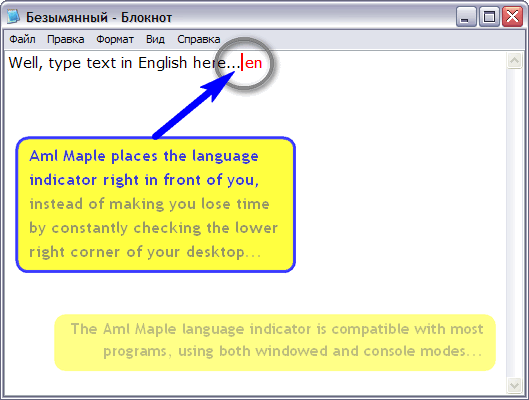
When it is active, the program shows the current
language next to the cursor when typing text. It is
possible to change the UI language, toggle US and UK
format for English, make the app automatically run at
every Windows startup until further notice and set a
delay time, as well as hide its icon from the Alt-Tab
list.
In addition, you can change the text cursor color,
move it beneath the cursor instead from the right,
adjust the text cursor width (in pixels), as well as
indicates the current language configuration of the
keyboard. It comes in handy when you are juggling
multiple projects in different languages at a time,
such as writing a paper for school or preparing a work
assigning while talking to friends on Facebook.
Once installed, Aml Maple creates an icon in the
taskbar notifications area and pops up the
configuration panel. It has a neatly organized
structure and intuitive options for all types of users.
Configure program settings easily
When it is active, the program shows the current
language next to the cursor when typing text. It is
possible to change the UI language, toggle US and UK
format for English, make the app automatically run at
every Windows startup until further notice and set a
delay time, as well as hide its icon from the Alt-Tab
list.
In addition, you can change the text cursor color,
move it beneath the cursor instead from the right,
adjust the text cursor width (in pixels), as well as
Program details
Publisher
Gosha MazovE-mail
Contact the publisherHome page
http://amlpages.com/home_am.phpPlatforms
Win7 x32<br>Win7 x64<br>Windows 10<br>WinServer<br>Windows XP<br>Windows 2000<br>WinVista<br>WinVista x64<br>WinOtherFile size
1181 KBFile date
2/20/2018License
SharewareInstallation
Install & UninstallRecord updated
3/15/2018

