Pathbuddy
Version 1.0
Freeware
Free
1 downloads
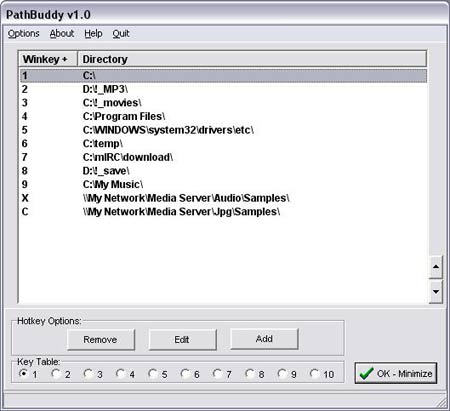
Pathbuddy lets you define hotkeys for selecting
folders in almost any program's Open & Save dialog (as
well as Windows Explorer). Normally, when you open a
Save dialog, you need to navigate to the folder that
you want to use, which can often be annoying.
Pathbuddy allows you to switch the dialog to any of
your favorite folders instantly, by simply pressing
the WinKey + a custom letter/number. So for example,
if I wanted to save a file in C:\Testfiles\stuff\etc\ -
I could just press WinKey+W on my keyboard to switch
the dialog to that folder. If you don't want to
remember all your shortcuts, you can press WinKey+A at
any time to bring up a list that allows you to simply
select the folder.
folders in almost any program's Open & Save dialog (as
well as Windows Explorer). Normally, when you open a
Save dialog, you need to navigate to the folder that
you want to use, which can often be annoying.
Pathbuddy allows you to switch the dialog to any of
your favorite folders instantly, by simply pressing
the WinKey + a custom letter/number. So for example,
if I wanted to save a file in C:\Testfiles\stuff\etc\ -
I could just press WinKey+W on my keyboard to switch
the dialog to that folder. If you don't want to
remember all your shortcuts, you can press WinKey+A at
any time to bring up a list that allows you to simply
select the folder.
Program details
Publisher
HBE-mail
Contact the publisherHome page
http://www.pathbuddy.com/Platforms
Windows 98<br>Windows ME<br>Windows 2000<br>WindowFile size
491 KBFile date
10/7/2002License
FreewareInstallation
Install OnlyRecord updated
12/24/2002

