|
|
 Aiseesoft iKnockin
-
Version
3.2.22
Aiseesoft iKnockin
-
Version
3.2.22
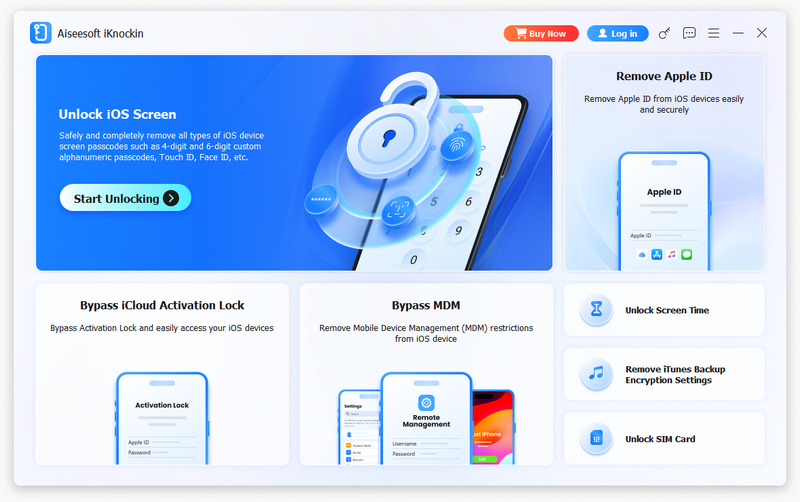
There are various reasons you might lose control of your iOS devices. Maybe you're wondering how to bypass the lock screen because you forgot your iPhone's passcode, or you forgot the password linked to your Apple ID, or you want to remove Screen Time restrictions. Whatever the case, Aiseesoft iKnockin can do you a great favor.
Key features:
1. Wipe iPhone passcode
If you are locked out of your iPhone because you forgot the passcode, whether your passcode is a 4-digit code, a 6-digit code, Touch ID, or Face ID, Aiseesoft iKnockin can help you remove the passcode and unlock the iPhone easily.
2. Remove Apple ID
If you forget your Apple ID or password, you will lose access to many Apple services. If your iOS device is properly configured, Aiseesoft iKnockin lets you remove the forgotten Apple ID and set up a new Apple ID account to activate your iPhone.
3. Recover/Remove Screen Time Passcode
If you receive a pop-up message saying that you have reached your limit on your iPhone, you should enter the Screen Time passcode to change the settings. But what to do if you forgot the restriction passcode? Aiseesoft iKnockin lets you recover or remove the passcode on your iPhone or iPad without any data loss.
4. Remove MDM from iOS devices
If MDM (Mobile Device Management) is restricting your iPhone and you are unable to access all the features of your device without restriction, you can try Aiseesoft iKnockin, which can help you remove MDM from your iOS device easily without data loss.
5. Remove iTunes backup passcode
Forgot your iTunes backup passcode and cannot get the encrypted backup? Please do not worry. Aiseesoft iKnockin can do you a favor. With this software, you can easily remove your iTunes backup passcode with just one click.
6. Unlock SIM Card
Some older smartphones often include a carrier-implemented SIM lock at purchase. This SIM lock means that you can only use SIM cards from approved carriers. However, Aiseesoft iKnockin allows you to quickly and easily remove SIM locks from all iOS devices.
|